
SRC – AutoSave 2026
Coming Soon!
Brief Visuals Below
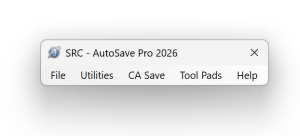
SRC – AutoSave 2026 Interface
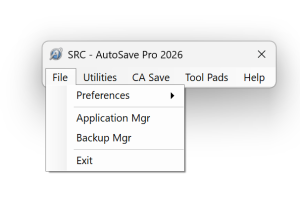
File Menu
- Software Settings Preferences
- Third Party Application Manager
- Backup Manager
- Exit Program
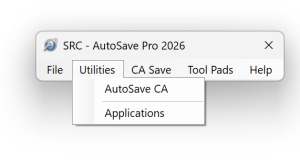
Utilities Menu
- AutoSave CA
- Applications
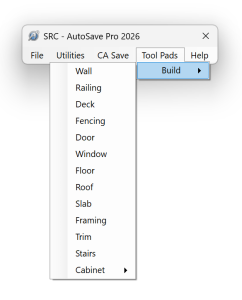
Tool Pads
- Build Menu
- Build Menu Tool Set
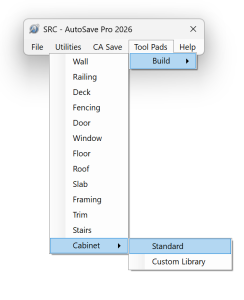
Cabinet Menu
- Standard
- Custom Library
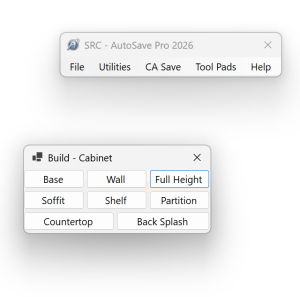
Standard Cabinet Tool Pad
- Base
- Wall
- Full Height
- Soffit
- Shelf
- Partition
- Countertop
- Back Splash
SRC – AutoSave 2026 Main Feature Set
-
SRC – AutoSave 2026
- Stay – On -Top interface.
- Set custom location
- Small footprint – Can reside within application title Bar / tool Bar
- Pop-Up timer window for auto save
-
File Menu
- Preferences – Program Custom Settings
- Application Manager – Custom drop down menu for third party applications
- Backup Manager – Save plan backups with custom location setting and file naming / Access backups on demand and at any point with ability to skip versions
- Utilities Menu
-
- AutoSave CA – Custom automatic save of all open plan files, layout files / Custom set save timer with timer window aligned with interface or in custom location / Coincides with Backup Manager
- Applications – Forms based database application for customer and plan records / Accounting link to Quick Books and Quicken / Plan search based on plan feature filters. Automatic new plan setup based on customer info entered / Tmer and timer record invoicing for billable hours / More to come… Database linked to Excel for exporting materials list to build detailed take off and estimate / method to create quote without having to draw every detail / Cabinet cut list, including door and drawers
-
Tool Pads
- Setup based on tool bar main menus and child menus, allows closing all toolbars, gaining additional screen workspace / Tool pads open center screen as default with stay-on-top attribute. Custom location Setting / Drag and drop for close access
-
Cabinet Menu
- Standard Tool Pad for program default cabinets
- Custom Library Tool Pad for access to imported custom cabinets
- And More …
SRC Software Solutions Invites Your Input!
Although this demonstration is based on a top tier residential CAD application, SRC AutoSave 2026 can be adapted to any windows CAD application with possible feature exceptions. This is NOT a subscription based application. SRC will offer the pricing of SRC AutoSave based on the feature set purchased. Owners of the program may purchase additional or new features as they wish.
Let us know your thoughts …